Chat Cards and Corrections
- Group item use, targets, attack or save results, damage, and effects with the action that produced them.
- Adjust supported rolls with the original dice. Use Apply and Undo directly from the card.
Built on Foundry’s native D&D5e system and official Wizards of the Coast books for Foundry, Ugmul’s 5.5e Automation handles routine combat steps and gives players and GMs time to make the decisions they would at the table.
From one attack or spell, the module checks the current result, range, spell slots, feature uses, and available actions or Reactions. It offers choices such as Warding Flare, Deflect Attacks, and Shield when they can change the outcome. Once those choices are resolved or declined, the action advances and applies supported damage, healing, or effects according to the GM’s settings.
We’ve tested and refined these features together to reduce overlapping automation and repeated chat updates. Targets, rolls, and results stay connected on compact cards, so the table spends less time recalculating totals, undoing damage, or switching between controls.
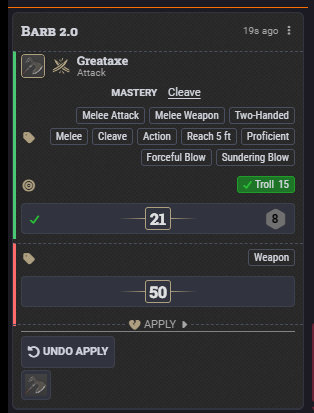
A typical strike’s weapon use, attack, and damage fit on one card. It shows the target and results together, cuts repeated details, and grows as reactions and rolls resolve.
See the target, chosen Brutal Strike effects, attack result, and damage together.
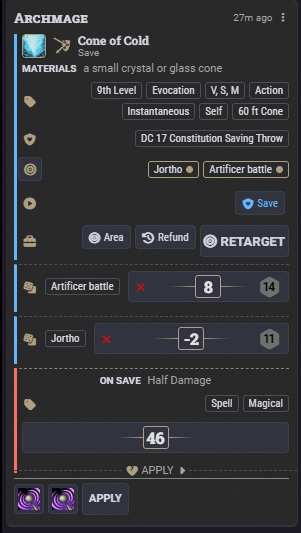
Review each target’s save alongside the spell’s damage and available choices.
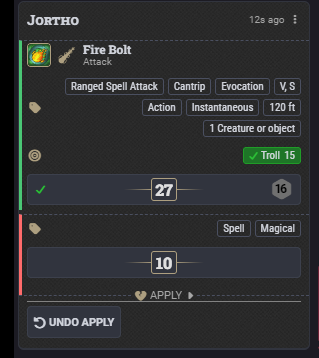
See the spell’s target, hit, damage, and Undo control in one card.
Healing and temporary HP use the same grouped approach. Choose your attack, save and healing layouts in Module Options. Select any screenshot to view it at full size.
The module uses supported items, activities, and effects from official Wizards of the Coast Foundry releases, including the Player’s Handbook and Monster Manual. Install the books separately for the features you use.
For Foundry VTT 14, verified with 14.370, and D&D5e 6.1.0 or later (verified on 6.1.0). The class updates target Player’s Handbook (2024) 3.0.0. Install and enable Automated Conditions 5e and Dice So Nice! alongside the module. Keep an active GM connected for shared resource, effect, and HP operations.
Updating existing characters? Updating the PHB does not replace features already on a character. Review older owned features before using the updated automation.
In Foundry’s Setup screen, open Add-on Modules → Install Module and use the installation manifest. Enable the module and its dependencies in your world, then refresh all GM and player clients.
These features use native D&D5e cards. Other automation packages, including Midi-QOL, or item macros that replace the same workflow can conflict. D&D Beyond imports are not verified and may need their activities or effects configured to match the documented sources. The detailed guides explain supported features and table-managed steps.